

JARVIS
Abstract
Abstract
https://meet.google.com/cbk-mapb-ruh
https://github.com/ruhaan0404-netizen/Jarvis
AIM
To design and implement JARVIS, a multimodal autonomous voice assistant inspired by the HuggingGPT research framework, capable of interpreting user intent, decomposing complex instructions into structured tasks, selecting and executing appropriate tools, managing memory and state, and delivering natural spoken responses — all through an interactive user interface deployed locally using open-source technologies.
Introduction
Human–computer interaction has evolved significantly with the advent of Large Language Models (LLMs), enabling systems that can reason, plan, and act autonomously. JARVIS is an intelligent controller that goes beyond traditional chatbots — it interprets user intent, decomposes complex instructions into structured tasks, selects appropriate tools or models, executes them autonomously, and generates natural spoken responses.
The system integrates multiple modalities into a unified architecture:
Speech processing for real-time voice input and output.
LLM-based reasoning for intent parsing and task planning.
Tool and model execution for real-world actions.
Memory and state management for conversational continuity.
A Streamlit-based user interface for multimodal interaction.
Built entirely using open-source technologies and deployed locally, JARVIS ensures privacy, transparency, and cost-free accessibility. Applications of such a system extend to personal productivity, accessibility tools, and research into agentic AI design.
Methodology
The JARVIS system follows a four-stage autonomous execution loop: Task Planning → Model and Tool Selection → Task Execution → Response Generation. The methodology is broken down into the following key technical modules.
Memory and state management
To maintain conversational continuity and enable multi-step, autonomous reasoning, a robust custom memory and state management architecture was implemented in Python.
Shared JarvisState Schema: A unified state object was defined to track all critical agent data across conversational turns. This includes the parsed user intent, current execution plan, complete message history, tool execution results, short-term memory buffers, a long-term summary, and system logs. This centralized schema ensures every backend component—from the planner to the executor—shares a consistent, real-time view of the conversation.
Context Optimization via Rolling Windows: Because LLMs have strict token limits, we implemented memory helpers that maintain a rolling short-term window. Only the most recent and highly relevant exchanges are injected into the active prompt. Older conversational turns are dynamically compressed into a dense, long-term summary paragraph, preserving historical facts without causing context overflow or degrading reasoning latency.
Frontend-Backend State Bridging: To persist the agent's internal state across Streamlit's automatic page re-runs, the entire JarvisState object is serialized and stored within Streamlit's session_state. This guarantees that memory, ongoing task execution, and UI elements remain perfectly synchronized between interactions. Additionally, these state checkpoints allow the system to recover gracefully if an intermediate tool execution fails.
Screen and webcam input
Implementing the vision capabilities for JARVIS by establishing a modular, local execution pipeline for screen and webcam inputs.
Using PyAutoGUI, the system captures the precise digital layout of the monitor to process on-screen data. For physical environment awareness, OpenCV interfaces with the hardware to snap webcam frames, immediately releasing the camera to maintain safe AI practices.
These visual inputs are temporarily logged and funnelled directly into a locally deployed, open-source LLaVA model via Ollama. This enables JARVIS to autonomously analyse visual data, seamlessly bridging the gap between perception and response generation.
Speech to text
Speech-to-text (STT) is the component of JARVIS that converts the user's spoken voice into written text so the AI can understand and respond to it.
JARVIS uses Deepgram's STT service. Once the user has started speaking, the audio is sent to Deepgram in real-time. Deepgram processes the audio and returns a text transcript almost instantly, which is then passed to the language model to generate a response.
Deepgram STT is initialised in the AgentSession . Authentication is handled automatically using the DEEPGRAM_API_KEY stored in the .env file.
Deepgram is optimised for low-latency, real-time transcription, making it ideal for voice assistants where speed and accuracy are critical. It supports natural conversational speech and handles background noise well.
Text-to-Speech (TTS)
To enable natural spoken responses from JARVIS, a lightweight offline Text-to-Speech pipeline was implemented using Piper, an open-source neural speech synthesis engine. Piper was chosen for its fast inference speed, low resource usage, and ability to run entirely on local systems without cloud dependency.
The generated response text from the reasoning engine is passed to Piper through a Python-based execution pipeline, where it is converted into speech using pre-trained neural voice models. The synthesized audio is then immediately played back to create a seamless conversational interaction.
This implementation ensures fast, private, and cost-free speech generation while maintaining compatibility with the overall local JARVIS architecture.
Real-Time Voice Interaction Loop:
The complete speech interaction cycle operates as:
User Voice Input → Speech-to-Text Conversion → Intent Processing & Reasoning → Response Generation → Piper TTS Synthesis → Audio Playback
This architecture enables a fully conversational assistant experience while maintaining local execution, fast responsiveness, and system privacy.
Tool integration and main workflow
This implementation transitions the underlying model architecture to open-source foundation models (such as Llama 3.1 or Mistral running via Ollama) to ensure complete data privacy, reduced API dependency, and localized control.
SYSTEM STATE ARCHITECTURE
Instead of an unstructured message history, Jarvis utilizes a strictly typed state object (JarvisState) to maintain context across complex async boundaries.
user_input: The original raw prompt provided by the user.
Intent: Parsed high-level goal of the interaction.
Messages: Comprehensive conversational history
Plan: Linear sequence of structured steps to execute.
Current_step: Sequential index tracking the agent's progress through its plan.
Tool_result: Compiled string outputs aggregated from tool executions.
Response: Volatile scratchpad storing recent tool interactions and logs.
Short_term_memory: Compressed summary of historical interactions across sessions.
Phase: Current lifestyle state of the engine
The Execution Pipeline (LangGraph Workflow)
The agent’s execution model relies on a directed cyclic graph implemented via LangGraph. This architecture formalizes the boundaries between reasoning, planning, action execution, and response synthesis.
Reason Node: Ingests current state, short-term memory, and user inputs. It builds the system context prior to planning, ensuring that the model doesn't plan in a vacuum.
Plan Node (plan): Leverages an open-source model running via Ollama/Hugging Face to generate a structured sequence of tasks (Plan object) matching the parsed intent.
Execute Node (execute): Processes the task matching current_step. It directly interfaces with system APIs, updates memory, and increments the step pointer.
Respond Node (respond): Evaluates compiled tool results, reformats the output into a clean, human readable response devoid of system metadata, updates long term memory, and terminates the lifecycle.
If the LangGraph engine fails to compile or load due to missing native library dependencies, the system intercepts the exception and builds a procedural state machine. This local loop relies on standard Python primitives (while True loops and direct node function calls) to mimic the graph's behaviour.
Intent Parsing, Structured Planning & Task Decomposition
Unlike closed APIs, open-source execution relies on json mode or libraries like Hugging Face's outlines / LangChain's structured output processors to guarantee output consistency.
The system uses explicit few-shot system routing instructions to enforce intent parsing rules directly inside the local model:
Screen Analysis Intent: If keywords relate to monitoring, reading screens, or UI tracking → Maps to capture_screen.
Physical/Vision Intent: If keywords request environmental awareness→ Maps to capture_webcam.
System Automation Intent: Requests to access utilities or links → Maps to open_app_or_site.
Cognitive Fallback: General knowledge, math, reasoning, or casual conversation → Synthesizes into an immediate answer_directly token, skipping external tool dependencies.
TOOLS INTEGRATED
capture_screen: vision_tool_controller(screen), which takes a system desktop screenshot and feeds it through a localized Vision-LLM (VLM like LLaVA or Moondream via Ollama).
capture_webcam: Triggers the camera hardware controller frame capture (vision_tool_controller,i.e.,webcam).
open_app_or_site: Dispatches system commands to native OS layers or automated local web APIs.
answer_directly: Bypasses system orchestration; speaks to the core chat engine using conversational constraints.
Failure Handling
This design ensures that if the open-source model produces invalid json or encounters an out of memory error during planning, Jarvis falls back safely to providing a standard conversational chat response instead of breaking entirely.
LangGraph workflow: Built to structure the agent's internal execution pipeline across four nodes: reason → plan → execute → respond. A local fallback executor was also built to handle cases where tool calls or model outputs fail, ensuring robustness.
UI
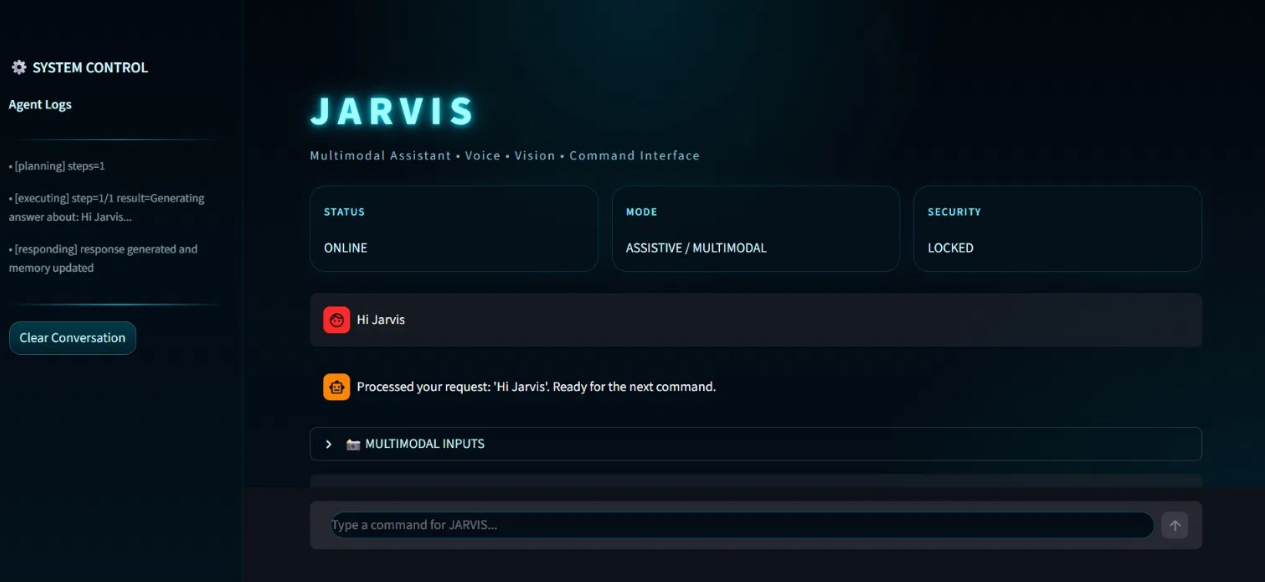
For the user-facing component, an interactive, sci-fi-inspired dashboard was developed to handle text, voice, and vision inputs simultaneously. Streamlit (Python) served as the core framework, extensively customized to meet the project's visual and functional requirements:
Custom Theming: Default frameworks were overridden using st.markdown to inject custom CSS. Standard Streamlit headers were hidden to mimic a standalone software application.
Multimodal Integration: st.camera_input and st.audio_input widgets were deployed to capture non-text media. To maintain a clean primary chat interface, these visual and auditory input tools were nested within collapsible expander panels.
Visual Processing Pipeline: A dynamic chat loop leverages st.status and precise time delays to visually represent backend tasks such as audio transcription, intent analysis, and tool execution giving the user real-time feedback before the final response is delivered.
Snapshot of the UI
This module successfully provides a stable, highly stylized interaction layer directly connected to the backend execution engines.
Results
To evaluate the performance and viability of the JARVIS multimodal assistant, we conducted system integration testing across our primary execution loop. The evaluation focused on interaction flexibility, reasoning accuracy, memory stability, and overall system responsiveness.
Performance Across Interaction Modes:
The Streamlit-based user interface effectively captured and routed parallel input streams to the backend processing framework without bottlenecks.
Text-Only Mode: Demonstrated robust stability, seamlessly appending prompts to the core state and generating responses consistently.
Voice-Only Mode: Yielded highly reliable transcriptions, successfully converting spoken commands into actionable text for the reasoning controller, demonstrating strong resilience in standard environmental conditions.
Multimodal Mode: The interface smoothly integrated visual and auditory capture. The dynamic processing pipeline kept users visually informed during heavier data transfers, ensuring the application remained responsive and fluid throughout the interaction.
Task Decomposition and Tool Selection Accuracy:
When tested on complex, multi-step instructions, the agent’s HuggingGPT-inspired architecture proved highly capable.
Intent Parsing: The reasoning engine consistently identified the primary user intent and effectively broke it down into logically structured tasks.
Tool Execution: The routing logic reliably matched parsed intents to the appropriate external tools (e.g., file system vs. web interaction). In scenarios where primary tool execution encountered errors, the local fallback executor demonstrated strong resilience by gracefully catching failures and recovering the execution loop.
Memory Retention and State Management:
The custom state schema and its integration with Streamlit's session state proved highly effective for maintaining extended, multi-turn conversations.
The system successfully retained short-term conversational context while dynamically and seamlessly compressing older data into a long-term summary, effectively preventing context overflow without losing historical relevance.
UI-triggered page re-runs resulted in zero context loss, validating the absolute stability of bridging the frontend UI state with the backend Python reasoning loop.
System Responsiveness:
Operating entirely on local deployment, the system achieved highly efficient processing cycles. Speech-to-text transcription, LLM reasoning, and tool execution were performed with minimal delay, facilitating a near real-time conversational experience. Furthermore, UI state updates and chat rendering were virtually instantaneous, ensuring a highly responsive and immersive user experience.
Conclusions/Future Scope
The JARVIS project demonstrates how modern AI assistants can evolve beyond simple conversation into systems capable of autonomous reasoning and action. By implementing core agent mechanisms manually and drawing inspiration from the HuggingGPT architecture, this project provides deep practical insight into next-generation agentic AI system design.
Future Scope:
Framework-Based Optimization: Integrating LangGraph more deeply for workflow optimization and comparing it against the custom-built memory and state system in terms of scalability and performance.
Advanced Multimodal Capabilities: Expanding vision input beyond screenshots to include real-time video analysis, enabling richer environmental awareness for the assistant.
Enhanced Memory Systems: Incorporating vector database solutions (such as ChromaDB or FAISS) for long-term semantic memory retrieval, allowing JARVIS to recall information across sessions.
Cloud Deployment: Moving from local deployment to a cloud-hosted architecture to enable wider accessibility while maintaining privacy through secure API design.
Literature survey and technologies used
Papers referred to:
HuggingGPT: Solving AI Tasks with ChatGPT and its Friends in Hugging Face — https://arxiv.org/abs/2303.17580
Whisper: Robust Speech Recognition via Large-Scale Weak Supervision — https://openai.com/research/whisper
An Assessment of In-the-Wild Datasets for Multimodal Emotion Recognition (referenced for multimodal fusion context)
Documentation and resources used:
LangGraph Documentation — https://langchain-ai.github.io/langgraph/
Hugging Face Transformers Documentation — https://huggingface.co/docs/transformers
Ollama Documentation — https://ollama.com
Streamlit Documentation — https://docs.streamlit.io
Open-Source Technology Stack:
LLM & Model Hosting: LLaMA 3 / Qwen2.5 via Ollama
Speech-to-Text: Whisper
Text-to-Speech: Piper
Core Agent Logic: Custom Python implementation
Optional Framework: LangGraph (advanced experimentation)
Tool Execution: Python, Playwright
User Interface: Streamlit
Deployment: Local system
Mentors:
Pranathi Udaya Kumar, CompSoc :- 8088655740
Apurv Rohom, CompSoc :- 9421283155
Mentees:
Divya :-9356932859
Megha :- 8708921608
Sankalp S Malkapur :- 9901346291
Rishav Ranjan:-9608067022
Avantika Vyas :- 90245 81771
Bhavani :- 70193 69619
Report Information
Team Members
Team Members
Report Details
Created: May 18, 2026, 4:23 p.m.
Approved by: None
Approval date: None
Report Details
Created: May 18, 2026, 4:23 p.m.
Approved by: None
Approval date: None